

Liva AI — the AI assistant woven through Cogliva
Liva AI is Cogliva's built-in AI strategy assistant. Wherever you work in Cogliva, Liva AI is one click away to draft a field, sharpen what you have written, suggest options, or challenge your thinking — and the Liva AI Assistant chat companion helps you navigate the platform and find your own work.
Draft from your context
Start any field with a strong first version. Liva reads what you have entered — the business, the challenge, the strategy — and drafts content you can refine, instead of staring at a blank box.
Sharpen what you wrote
Improve, clarify, shorten, or make a passage more strategic and executive-ready. Liva keeps your intent and lifts the quality, so the output reads like senior work.
Challenge your thinking
Ask Liva to pressure-test a choice, surface gaps, name hidden assumptions, or give you a few distinct options — a constructive second opinion at the moment you need it.
Built into every module
The same Ask Liva button appears next to fields, sections, and pages across the diagnostic wizard, Business Strategy Designer, tactical plans, Strategy Workbench, and Strategic Signals.
Grounded, not generic
Liva draws on your diagnostics, organization and project context, and the Cogliva Intelligence layer — so suggestions fit your situation rather than reading like a generic chatbot reply.
You stay in control
Liva can suggest, improve, and challenge — but nothing changes until you choose to insert, replace, or append it. Every suggestion is a draft for your review and judgment.
Original vs Suggestion, side by side
Ask Liva opens as a two-panel dialog: your Original text on the left, Liva's Suggestion on the right once you press Generate. Compare before you commit — insert, replace, or append only when the suggestion improves on the original.
Dictate straight into the Original panel
Hit the microphone in the Original panel and speak your first draft. The mic warms up before recording so the first words are not clipped, then quick actions such as Clean up, Fix grammar, or Make it more strategic turn the transcript into a well-formed draft.
Help in three steps, right where you are
Open Ask Liva
Find the Ask Liva button next to a field, section, or page — wherever you are working in Cogliva.
Pick or describe
Choose a suggested action — the options adapt to whether the field is empty or already written — or type your own request.
Review and apply
Read Liva's draft, edit anything, then insert, replace, or append it. Nothing changes until you choose to apply it.
Where Liva AI shows up in Cogliva
Liva is not a separate place you go to — it travels with you. Look for the Ask Liva button across the platform:
- Diagnostic wizard — describing the business and defining the challenge
- Business Strategy Designer — the fields that shape your strategy
- Tactical plans — turning objectives into actions, milestones, and owners
- Strategy Workbench — capturing and refining strategic topics
- Strategic Signals — describing what to monitor and why it matters
- Organizations & projects — framing the context Cogliva works from
A Liva AI chat companion for your whole workspace
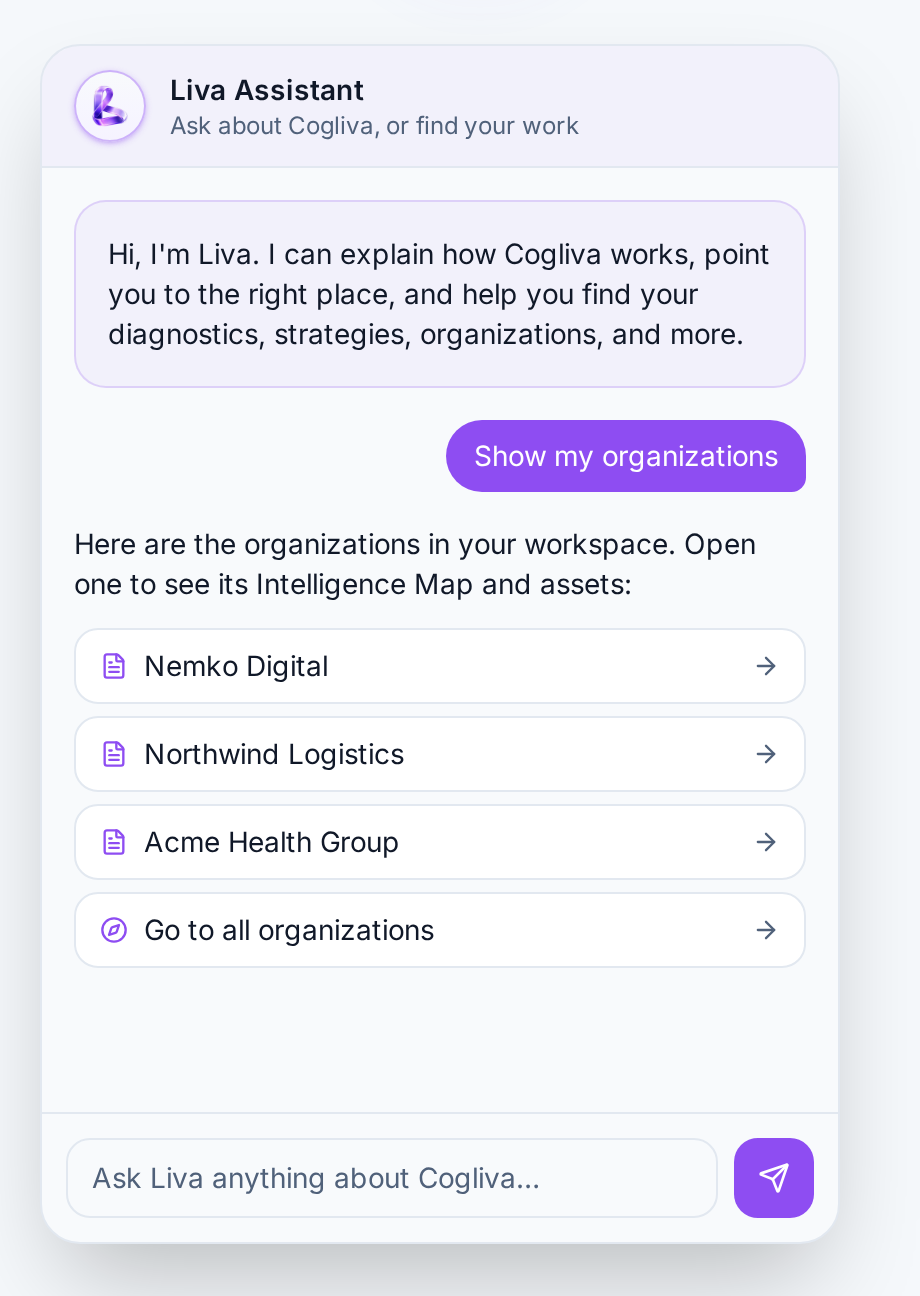
Alongside the inline Ask Liva helper that drafts and improves individual fields, Cogliva now includes the Liva Assistant — a floating chat companion you open from the glowing Liva mark in the corner of the app. Ask it how something works, where to find a feature, or to locate your own diagnostics, strategies, and organizations — and it answers with clear guidance and clickable links that take you straight there.
Ask in plain language
“How do I run a diagnostic?” or “Where is my Meridian Digital organization?” — Liva understands and responds.
Find your own work
It searches your workspace within your permissions and returns clickable links to your records — no digging through menus.
Guided, not just answered
Explanations point to the right page and next step, so you always know where to go.
Read-only and private
The assistant only reads and links — it never changes your data. Conversations are not saved beyond your active session and are available to every signed-in member.
Powered by Cogliva Intelligence
Liva is the assistant; Cogliva Intelligence is the managed knowledge it draws on — the business challenge and strategy method libraries, business-context coding, standards knowledge, and your own diagnostics, organizations, and projects. That is why Liva can move from a vague field to a structured, situation-aware draft instead of generic text.
Learn about Cogliva IntelligenceAn assistant, not a replacement for judgment
Liva can suggest, improve, and challenge content — review it before you apply it. Treat every suggestion as a strong first draft, check it against what you know, and edit it to fit your situation. The same principle of human review applies to every AI-assisted output in Cogliva.
Trust & Responsible AILiva AI — frequently asked questions
What is Liva AI?
Liva AI is Cogliva's built-in AI assistant. It works inside every field, section, and page of Cogliva — the diagnostic wizard, Business Strategy Designer, tactical plans, Strategy Workbench, and Strategic Signals — to draft a first version, sharpen what you have written, suggest options, or challenge your thinking. Liva AI is grounded in your organization context and the Cogliva Intelligence layer, so its output fits your situation.
Never start from a blank field again with Liva AI
Liva AI is built into Cogliva from your first diagnostic — no separate setup.